Contact Manager You can now manage your contacts directly in QuickText! Import contacts from Excel or CSV files with a step-by-step wizard. Features include phone number standardization, duplicate handling, and list assignment. Learn more in the docs
Import Contacts to Send List Easily import contacts from your Contact Manager into the Send List. Optionally set a message for all imported contacts at once, or use placeholders for personalization. Learn more in the docs
Progress Indicator in Phone Validator Added a visual progress bar in the Phone Number Validator sheet so you can see the validation progress.
🐛 Fixes
Formula Error Handling Fixed a crash that occurred when a cell in the Phone Number or Send List contained a formula error (e.g., #VALUE!, #REF!) instead of text or a number. These cells are now gracefully skipped.
Temp File Permissions QuickText writes temporary files to the user's temp folder by default. If that location is not writable due to permission issues, QuickText now automatically finds an alternative location with sufficient permissions.
⚙️ Improvements
Under-the-Hood Optimizations Various minor improvements for better stability and performance.
Removed Logging and ASR Bypass
The logging feature and the ASR bypass, which were introduced in version 1.1, have been removed. Both features triggered false positive warnings in several antivirus programs. To avoid any issues for users, I decided to take them out.
Device Management
Added a new button to view and manage the devices linked to your license. You can now see all devices connected to your account and remove old or unused devices if needed.
🐛 Fixes
Update Button Not Clickable
Fixed an issue where the update button was unresponsive in some cases.
⚙️ Improvements
Performance Optimizations
Made several under-the-hood improvements to make QuickText faster and more reliable.
ASR Rule Bypass
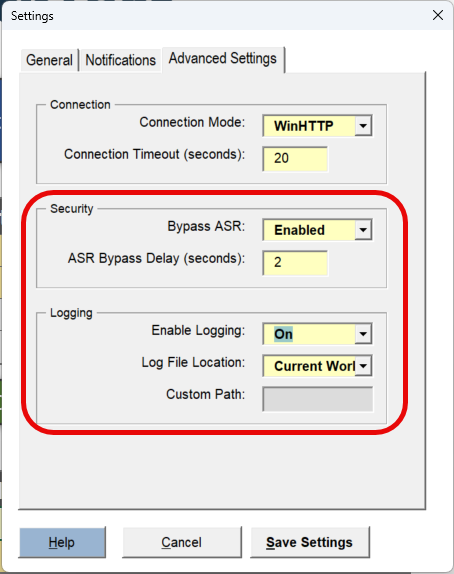
Some systems with Microsoft Defender’s Attack Surface Reduction (ASR) rules enabled were preventing QuickText from running. A new option has been added under Advanced Settings to bypass this restriction, allowing the tool to function as expected in those environments.
Debug Logging
A new Logging option is now available in Advanced Settings. When enabled, QuickText will generate a log file to assist with troubleshooting and support.
🐛 Fixes
Incorrect Failure Status on Ping
Resolved an issue where a successful ping from Excel was incorrectly marked as a failure. This prevented SMS messages from being sent even though the connection was active.